
If you are a new student, you are required to complete a short Moodle orientation before you can access your assessments. Please follow the instructions below to access the Moodle orientation course.
Step 1 : Navigate to https://moodle.aih.edu.au/
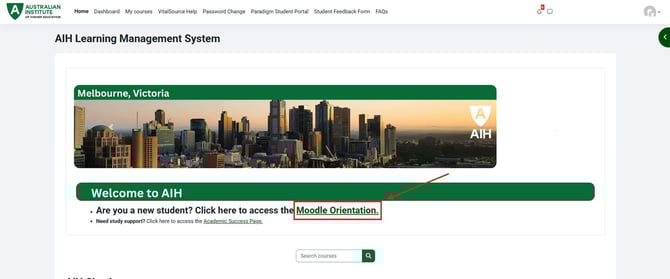
Step 2 : Click on the banner on the Moodle home page which says " Are you a new student? Click here to access your Moodle Orientation ". Alternatively, you can access it by click on " My units " at the top of the page.
Step 3: In this page, you will be able to access your Moodle Orientation. Simply click on one of the tiles to access the presentation for that topic. You will be required to go through the module and answer all the questions 100% correctly. Once you have done that you will see a green tick on the top right of the tile you have completed. Once you have completed each tile of the Moodle Orientation, the " Summary " tile will become unrestricted and you will be able to unlock your assessments.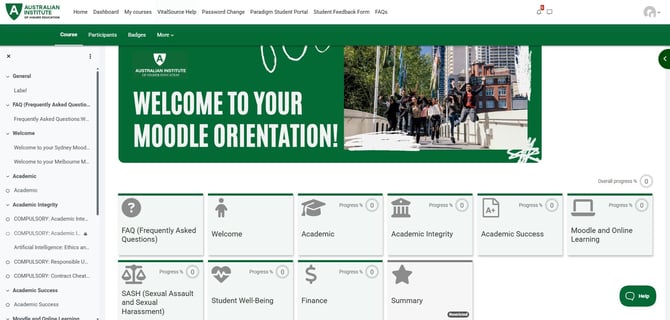
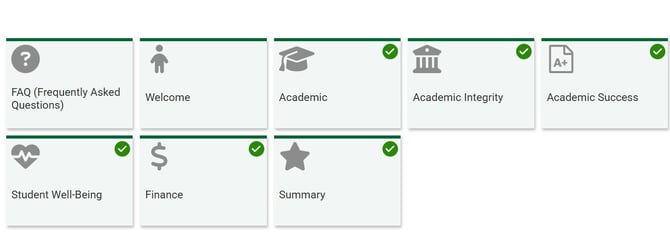
Note: Please ensure that you have completed your Moodle orientation prior to class commencement. If you have not completed this course, you will be unable to access your assessments. If you are confused, please refer to the FAQ which can be found within the Moodle Orientation.